

How to Set Up SaaS Marketing Attribution Tracking
To put together an attribution model for your SaaS you need to integrate your advertising platforms, web analytics, marketing automation software, and Customer Relationship Management (CRM) systems into one data pipeline.
The requirement for this arises from the software buyer’s journey, which encompasses multiple stakeholders, various devices, and an extended period for decision-making, which traditional single-click tracking pixels do not adequately capture.
Following this guide will help you put in place an infrastructure that links all the touchpoints with the revenue generated by the contract and so be able to identify the channels that lead to customers and not just free trial registration.

Concept snapshot
-

Category: Revenue Operations
-

Used By: B2B SaaS Platforms
-

Related Concepts: SaaS Marketing Automation, Customer Journey Mapping, SaaS ABM, Server-Side Tracking
-

Stage in Growth: Scaling Account Level Revenue
Install a Server-Side Tracking Container
The effectiveness of standard browser-based pixel tracking is influenced by the presence of privacy applications and ad blockers.
One solution is to move the data collection process to a server-side “container” and have it hosted under your own domain name. This process involves the transfer of information from your web server to your marketing tools, where event data is maintained in its original form, and a uniform set of rules is present. This type of framework, when applied, has the capacity to influence the processing of missed conversions and the structuring of financial statements.
To create this server-side “container”, you need to:
- Open a new container in your Google Tag Manager account and select Server as the deployment type.
- Get a cloud instance from Google Cloud Platform or any other server infrastructure provider and upload the script handler.
- Create a new record in your DNS manager (for example, metrics.yourdomain.com) and direct it to your new server container so that it refers to a first-party domain.
- Update the main website code to incorporate the new tracking snippet that will enable the monitoring of all the usual page view and click events onto the new custom subdomain instead of the usual third-party sites.
- Create a new server-side tag in the GTM workspace to track events from Meta Conversion Api, LinkedIn Conversions API, and Google Analytics 4.
Within 1 to 7 days, client-side cookies may be blocked or removed, a condition associated with privacy features including Safari’s ITP.In contrast, server-side tracking depends on setting first-party cookies with a lifespan of up to two years, which is crucial for the extension period of SaaS products.
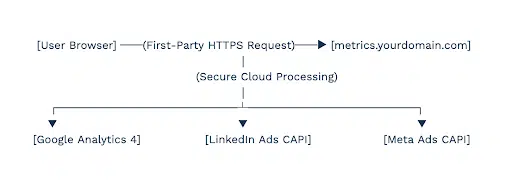
When a server container experiences operational issues, an initial step involves assessing the instance’s monthly bandwidth utilization. For safety, create an alarm system inside a cloud hosting panel to avoid incidents when there is a sudden increase in the amount of traffic.
Free SaaS Marketing Attribution Checklist
Build a privacy-proof data pipeline and map complex buyer journeys with this SaaS marketing attribution setup resource:
-

Server-side tracking configuration steps
-
UTM Taxonomy naming
-
Account-based mapping workflows
-
ROAS reporting formulas
Standardize UTM Parameters and Parameter Capturing
Discrepancies in tracking parameters can complicate independent cross-channel analysis and typically involve efforts for data record rectification. The consistency of linking among accounts, social networks, emails, and partners can impact the quality of information present in the marketing database. This kind of configuration allows any execution or processing of traffic to be done without the help of a person.
Invest some time into cleaning the data in the early stages of the process and thus avoid making mistakes like including different capitalized versions of the same channel in one table.
To create your tracking taxonomy:
- Put together a template in a spreadsheet where the marketing team will find the UTM creator and ensure there are no mistakes in the campaigns’ parameters.
- Apply strict lowercase rules to the elements of the table with data to avoid the division of the data into separate rows for example values like LinkedIn, linkedin and LINKEDIN.
- Modify your product signup forms to include hidden text boxes that are prefilled with the values for the sources, media, campaign, content and unique browsers like gclid or fbclid.
- Maintain a basic JavaScript function on the pages of your landing pages to watch for the URL containing the query string, to grab those particular variables, and then to save them in the visitor’s session storage.
- Set your forms to automatically grab the information from the visitor’s browser and append it to the hidden fields as the visitor is pressing the submit button.
|
UTM Parameter |
Naming Standard Rules |
Practical SaaS Campaign Example |
|
utm_source |
Identify the concrete platform name |
google, linkedin, g2, youtube |
|
utm_medium |
Identify the distribution model or ad type |
cpc, sponsored_update, email, organic |
|
utm_campaign |
Use the specific product line or feature theme |
competitor_pricing, soc2_compliance |
|
utm_content |
Distinguish between copy, design, or layout assets |
screenshot_ui, founder_video, text_v1 |
A team leaves their ad platform settings as is, with one marketer using utm_source=Google and another using utm_source=google_ads. When the database places these in distinct rows, it leads to channel-level calculations being completed through manual means afterward.
Free SaaS Marketing Attribution Checklist
Build a privacy-proof data pipeline and map complex buyer journeys with this SaaS marketing attribution setup resource:
-
Server-side tracking configuration steps
-
UTM Taxonomy naming
-
Account-based mapping workflows
-
ROAS reporting formulas
Map Anonymized Touchpoints to CRM Identity
Connecting an anonymous visitor’s first visit to their “Closed-Won” designation in the CRM is a process that requires careful management due to its inherent complexities. To keep track of an individual person’s activities across different systems, the identity tracker should also be extended to include unobtrusive functions.
Upon an unknown user’s visit to your website, the tracking script assigns a random cookie value to the visitor’s local browser profile. Activity of this tracking ID is maintained when the site visitor provides certain details, including the page visited, content engaged with, and request origin, within an unpopulated user profile. Identity fusion occurs once an anonymous prospect provides an email address in a trial registration form or download request.
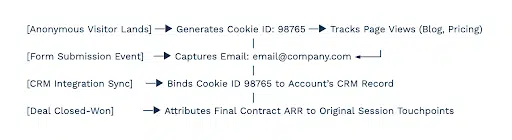
To achieve this kind of connection:
- Consider integrating a database or an analytics application with your website to generate a unique user identifier cookie, for example, the GA4 client_id.
- Set up a marketing automation system to capture this information together with form submissions, copying it to a separate field in your CRM record.
- Build a query in SQL or a marketing data layer that uses the lead’s identity to bring in all the events that were logged to that identity in previous visits and assign them to the new contact record.
- Set up an automated webhook that gets triggered whenever an account executive moves an opportunity to the “Closed-Won” status.
- Tell the system to follow the CRM contact record from the custom cookie field back to the session log and find out all the marketing channels that were present in that session.
When a considerable volume of new contact profiles is generated in your CRM without accompanying cookie information, this situation might arise if your forms contain scripts that are blocked or load prior to the tracking container.
Free SaaS Marketing Attribution Checklist
Build a privacy-proof data pipeline and map complex buyer journeys with this SaaS marketing attribution setup resource:
-
Server-side tracking configuration steps
-
UTM Taxonomy naming
-
Account-based mapping workflows
-
ROAS reporting formulas
Configure Your Base Attribution Model
Thus, how to recognize the right attribution model: First-Touch, Last-Touch or Linear for the sales process?
The selection of the attribution model is also dependent on the extent of the product’s sales process, which is also influenced by the volume of monthly transactions. A deviation of the model from the sales process can impact how funds are distributed, possibly leading to an over-allocation towards activities for product user acquisition or to search engine clicks that occur after the decision phase.
By utilizing the attribution model that incorporates conversion speed, the reports can reflect aspects of the business’s operations.
When trying to put together the strategy for your allocation:
- Go through all the cases to determine what the average sales cycle is and the amount of contact the account has.
- Apply the methodology according to this operational framework:
|
Attribution Model |
Primary Operational Benefit |
Ideal SaaS Sales Match |
|
First-Touch |
Highlights early top-of-funnel discovery channels |
Seed-stage startups optimizing purely for market awareness |
|
Last-Touch |
Measures final immediate conversion triggers |
Self-serve transactional apps with sales cycles under 7 days |
|
Linear |
Spreads value across multiple content touches |
30 to 90-day buyer paths with 5 to 10 distinct research actions |
|
Position-Based |
Highlights both discovery hooks and closing events |
Complex enterprise sales cycles lasting 90 to 180 days |
- Open a tool or go to the analytics space of your company’s tools with the settings under the control of the administrator to get the settings for your model.
- Edit the primary settings of the models with the help of your model logic in all the accounts’ dashboards.
- Create a window to track the effect of budget changes on the Cost of Customer Acquisition.
The implementation of an algorithmic machine learning attribution model may be less impactful for business activities with 50 or fewer new customers per month. These models utilize substantial data for their operation. With reduced data volume, outcomes may exhibit increased variability or susceptibility to external influences, such as web traffic changes.
Free SaaS Marketing Attribution Checklist
Build a privacy-proof data pipeline and map complex buyer journeys with this SaaS marketing attribution setup resource:
-
Server-side tracking configuration steps
-
UTM Taxonomy naming
-
Account-based mapping workflows
-
ROAS reporting formulas
Integrate Account-Based Tracking and Dark Social
A significant portion of the time spent on the research stage of a software purchase is taking place in non-public areas of the internet. These include Slack channels, private groups, podcasts, and direct messages between individuals.
The reporting of activities not monitored by click-based cookies as traffic origins in your database can affect the distribution of investment towards generic search engine marketing. To avoid this information manipulation, create a process to track marketing and sales activity, including customer responses to offers.
To fully engage with these non-apparent transactions:
- Add a non-buyable text box to your primary high-intent website forms that includes a statement of “How did you hear about us?”
- Configure it to log the responses into a separate text column in the contacts’ profiles in your CRM.
- Create a data integration program inside your customer data platform to get the contact information of the different companies where the contact is working and merge it with the contact’s profile in one single record using the company’s email extension (e.g. @domain.com).
- Create a rule basis in your reporting system to assign a marketing channel if an engineer clicks on a useful link, or their VP of engineering requests a demo in one of the paid search boxes a few weeks later.

A prospect is discovering your SaaS in a private Slack workplace, listening to your founder in one of the podcasts, and only then does she start to look for you on the internet. This is marked as a new “Direct” interaction in the traditional tracking. However, the entry “SaaS Metrics Slack and Podcast” in the form provides information for manually attributing this activity to social media dark marketing.
Free SaaS Marketing Attribution Checklist
Build a privacy-proof data pipeline and map complex buyer journeys with this SaaS marketing attribution setup resource:
-
Server-side tracking configuration steps
-
UTM Taxonomy naming
-
Account-based mapping workflows
-
ROAS reporting formulas
Sync Offline CRM Events Back to Ad Networks
To improve the effectiveness of digital ads delivery systems and focus on the revenue generated by the pipeline instead of just the number of clicks, you need to relate the progression metrics in the CRM to your advertising networks. Such systems have replaced the traditional method of manual control of advertising campaigns with one that is based on financial returns.
These returns come from correcting the placement of the audience, or the group of users, with whom the ads are shown, and the ads that are shown to them. If you insert the conditions and consequences of the contract into your ad networks, they will start looking for a better audience, one that matches your buyers’ profiles.
To create this kind of continuous data pipeline:
- Start by enabling the use of special identifiers to be created by ad clicks (GCLID for Google Ads, LiClid for LinkedIn) in your ad libraries.
- Create tracking steps within your CRM system to note the change in the stage of the opportunity when the opportunity is changed from a dunce to a qualified prospect or an closed won account.
- Set up a safe channel using native CRM interfaces or cloud apps (for example, Zapier) to send event information to the ad networks within 90 days.
- Connect your pipeline files that contain the payload with any object that is valid: click IDs, status names, conversion timestamps, and the actual value in the software or the amount of the software contract.
- Change your ad bidding strategy within your search campaigns from “Maximize Conversions” to “Maximize Conversion Value” only after your platform has accumulated at least 30 offline values.
It is advisable to moderate the projected value figures provided to advertising networks during the pipeline’s early stages. Assigning such values informs the optimization algorithm about audiences with low conversion probabilities. Until a contract is signed, use very low, historical values based on previous conversions.
Build a Revenue-Weighted Performance Dashboard
To understand if a marketing channel increases or decreases platform revenue, allocate a single table in your CRM for sales and take into consideration only completed sales. If Cost-Per-Lead (CPL) is the exclusive metric for performance evaluation, investments could be directed to activities that produce leads with a limited impact on revenue generation.
The practice of comparing channel-specific expenses with Customer Lifetime Value gives an impression of true profitability models.
To get the overall financial performance picture:
- Connect the ad spend variables in your active advertising networks with a centralized data processing interface like Looker Studio.
- Join the ad spend amounts with the CRM opportunities revenue tables using a SQL combine.
- Build performance measurement equations into your workspace in such a way that they give an exact representation of Customer Acquisition Cost and the Return on Ad Spend using standard formulas:
|
CAC = (Total Channel Marketing Cost + Attributed Labor) / Number of Acquired Paying Customers |
|
ROAS = Attributed Net New ARR / Channel Marketing Spend |
- Create structured reporting panels that include marketing channels together with the revenue performance metrics:
|
Target Channel |
Ad Expense |
Paid Trials |
Net New ARR |
True ROAS |
|
Paid Network X |
$12,000 |
600 (High) |
$1,500 |
0.12x |
|
Paid Network Y |
$12,000 |
80 (Low) |
$48,000 |
4.00x |
- Set up an automatic weekly email trigger to send this chart overview to your team leads, who will then make the necessary changes.
Conclusion
To create a stable SaaS attribution model, you should consider investing in a server-side tracking solution, standardizing link parameters, and mapping CRM events with ad networks.
This kind of data infrastructure allows monitoring activities performed on the website in the process of individual or account-based marketing campaigns and attributing them to finalized deals. Monitor match rates once every month and adjust your costs according to the revenue generated, not the number of leads generated.
Ready to get started?
We’ve been where you are. Let’s share our 20+ years of experience and make your global dreams a reality.

FAQ
-
E-commerce tracking systems have a simple perspective of tracking a typical retail purchase journey, while traditional B2B systems are focused on just the value of a single transaction. For SaaS attribution, the focus is on a non-linear extension process that extends over multiple devices, and includes a combination of a single purchase and an ongoing Monthly Recurring Revenue (MRR) subscription, renewal, and product upgrade sessions.
-
Ad platforms such as Google, Meta, and LinkedIn employ distinct tracking systems to attribute the conversion if user presence in their networks occurred during the purchase timeframe. An independent attribution model fixes this by creating a separate channel for each activity and eliminating overlapping paths. This provides a depiction of the actual events.
-
Sophisticated multi-touch or machine-learning attribution models tend to generate less consistent findings for SaaS companies with fewer than 50 closed-won accounts monthly. Rather, focus on simple first-touch and last-touch single-source attributions to get a better understanding of the basic reasons for people to have heard of you in the first place and later decide to do business with you.
-
Last-touch attribution assigns full credit for a conversion to the final recorded action, which may result in a higher observed contribution from branded search ads and direct traffic. Incomplete data contributes to a varying budget distribution for teams addressing product awareness and those involved in subsequent activities. In relevant contexts, funds designated for effective demand generation activities may occasionally be subject to unintentional adjustment.
-
In order to enhance privacy, many websites have started to adopt policies that call for the removal or deletion of client-side cookies after just one day to one week.The conversion path is characterized by fragmentation, as the final interaction consists of a single click. Otherwise, one way to approach this is to move to a server-side tracking approach in which first-party data are set as variables with a lifetime of up to two years. This way, you will be able to keep the whole customer journey in one piece.


 English
  Español
  Português
  Português do Brasil
  Français
  Italiano
  Deutsch
  Nederlands
  Polski
  Română
  Українська
  简体中文
简体中文  日本語
日本語  한국어
한국어